

The Problem of Lost Copies
If you use a Mac, iPhone, or iPad for work, you have likely experienced the frustration of copying something important—a link, a code snippet, an address, or a paragraph from an email—only to copy something else moments later and realize the first item is gone. Apple's built-in clipboard stores only the most recent item, so each new copy overwrites the previous one. For anyone who frequently juggles multiple pieces of information, this limitation can be a constant source of annoyance, breaking workflow and forcing you to hunt down lost text. While Apple has improved continuity with Universal Clipboard, which allows copying and pasting across devices, it still only remembers the last item. This is where dedicated clipboard managers like ClipboardAI come into play, offering a persistent, searchable history that saves every item you copy until you decide to clear it.
What Is ClipboardAI?
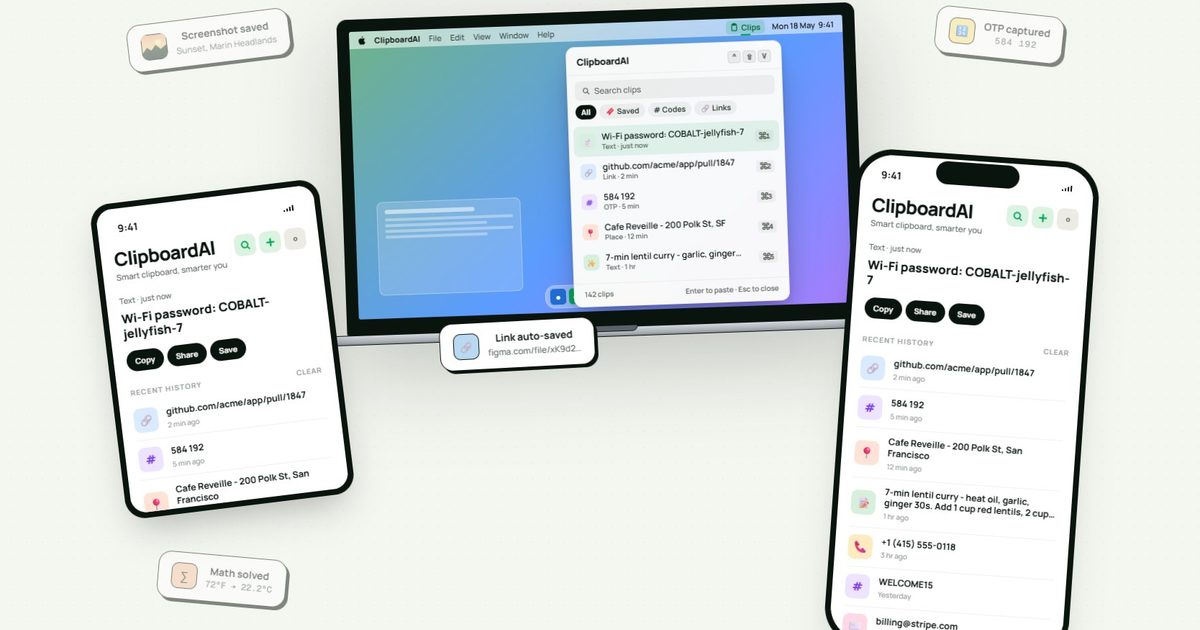
ClipboardAI is a cross-device clipboard management app designed specifically for Apple's ecosystem—Mac, iPhone, iPad, and even the Apple Watch companion. Its core promise is simple: never lose a copied item again. Instead of replacing the last thing you copied, ClipboardAI stores everything in a searchable history that can be synced across your devices using your own iCloud account. The app goes beyond basic history by using on-device artificial intelligence to automatically detect and sort copied content into categories such as links, codes, email addresses, phone numbers, addresses, images, and plain text. It also allows you to create custom collections for frequently reused material like research links, email templates, travel details, or code snippets. This AI-driven sorting is performed entirely on your device, meaning no data ever leaves your machine for analysis—a critical privacy feature we will discuss later.
Core Features and Workflow
The central feature of ClipboardAI is the clipboard history panel, which can be accessed via a keyboard shortcut, a menu bar icon on Mac, or a widget on iOS. History items are displayed in reverse chronological order, with a search bar that lets you instantly find any clip by keyword. The app also includes a powerful keyboard extension for iOS that can display up to 20 recent clips directly inside any text field. This means you can be typing in Messages, Mail, Slack, Safari, or any other app and access your clipboard history without leaving the app. The extension respects privacy settings—you can choose to hide sensitive clips from the extension entirely. Beyond simple storage, ClipboardAI offers a suite of smart tools: it can summarize long text, generate link previews, detect languages, translate text, turn bullet points into checklists, and even solve math expressions or perform unit conversions. These utilities are integrated into the clipboard interface, so you can, for example, copy a formula and immediately see the result, or copy a foreign phrase and get a translation inline. While some of these tools are situational, they add a layer of intelligence that makes the app more than just a clipboard buffer.
Privacy and Security: A Make-or-Break Factor
Clipboard content is often sensitive—passwords, API tokens, credit card numbers, social security numbers, private messages, and personal addresses can all pass through the clipboard. Apple's own clipboard does not store these historically, but if you use a third-party clipboard manager that uploads data to servers, you risk exposure. ClipboardAI addresses this by keeping all AI processing on-device. It uses SwiftData for local storage and explicitly avoids collecting analytics, displaying ads, or sending data to third-party SDKs. There are no developer-run servers involved; the only optional cloud element is iCloud sync, which uses the user's own private iCloud account. Furthermore, the app actively detects sensitive content such as passwords, credit card numbers, and SSNs. When it identifies something sensitive, it blurs the item by default and can automatically delete passwords after 60 seconds. Sensitive clips can also be excluded from the keyboard extension, adding an extra layer of protection against accidental pasting in front of others. This design means that even if your device is lost or compromised, the clipboard history is not aggregated on a remote server that can be breached.
Syncing and Availability
iCloud sync is optional, which is a smart move for users who prefer to keep everything local. When enabled, your clipboard history seamlessly syncs across all your Apple devices logged into the same iCloud account. This means you can copy a phone number on your Mac and paste it on your iPhone a minute later, without having to rely on Universal Clipboard (which only transfers the last item). The sync is fast and encrypted in transit and at rest via Apple's infrastructure. ClipboardAI is available as a free download on the App Store for iOS and macOS. The free tier includes automatic capture of copied items, category sorting, search, and up to 10 saved clips at a time. For most users, the free version may be enough to test the water, but the 10-clip limit can prove restrictive if you copy dozens of items during a work session. The Pro subscription (available with a 7-day yearly trial) removes the clip limit, enables iCloud sync, unlocks the keyboard extension, provides all AI features, and allows unlimited collections. The lifetime purchase is priced at $24.99, which is competitive with other clipboard managers in the market.
Why You Might Need a Clipboard Manager
The copy-paste operation is one of the most common interactions in modern computing. Power users—developers, writers, researchers, customer support agents, and anyone who handles multiple pieces of information simultaneously—can benefit enormously from a clipboard manager. Without one, you are forced to manually juggle notes, open multiple browser tabs, or re-copy the same items repeatedly. According to user studies, the average knowledge worker copies and pastes dozens of times per hour. The cognitive load of remembering which item you last copied and where it is can add up, leading to errors and wasted time. ClipboardAI is not the only clipboard manager on the market, but its combination of on-device AI, cross-platform Apple support, strong privacy stance, and affordable pricing makes it a compelling choice for the Apple ecosystem. It also integrates with other tools via its export and import features, allowing you to extract collections for use in other apps.
Use Cases and Practical Examples
Consider a software developer working on a bug fix. They might copy a stack trace from a console, then a code snippet from a documentation page, then an error message from a teammate's Slack message. With ClipboardAI, all three pieces remain in the history, searchable by keywords like 'error' or the function name. The developer can also add the stack trace to a collection named 'Bug Reports' for later reference. For a student writing a research paper, ClipboardAI can hold multiple citations, URLs, and quotes simultaneously, and the AI can automatically detect and format them. For a customer support representative, the app can store canned responses in collections and quickly paste them in emails or chat windows without leaving the interface. The translation and summarization tools can be particularly useful when dealing with international clients or lengthy documents. And for anyone concerned about security, the automatic blurring of passwords means that even if you accidentally reveal your clipboard history on a screen sharing session, sensitive data is masked.
Is It Worth Switching From Apple's Built-In Clipboard?
Apple's Universal Clipboard is convenient for quick, one-off cross-device pastes, but it lacks history, search, and categorization. If you rarely lose track of copied items, the built-in solution may suffice. However, if you find yourself repeatedly opening a note app just to store temporary text or searching your browser history for a link you just copied, ClipboardAI could save you time and frustration. The 10-clip free version is a good starting point to evaluate the workflow. The app is lightweight and responsive, with minimal impact on battery or performance. The developer also maintains a clear privacy policy and has been transparent about data handling, which is reassuring in an era where many apps hoover up clipboard data for advertising purposes. Overall, ClipboardAI is a well-designed utility that addresses a common pain point in a thoughtful, privacy-respecting manner. It does not replace Apple's clipboard; it enhances it with intelligence and history, turning a one-slot memory into a personal database of everything you copy.
Source: Digital Trends News