

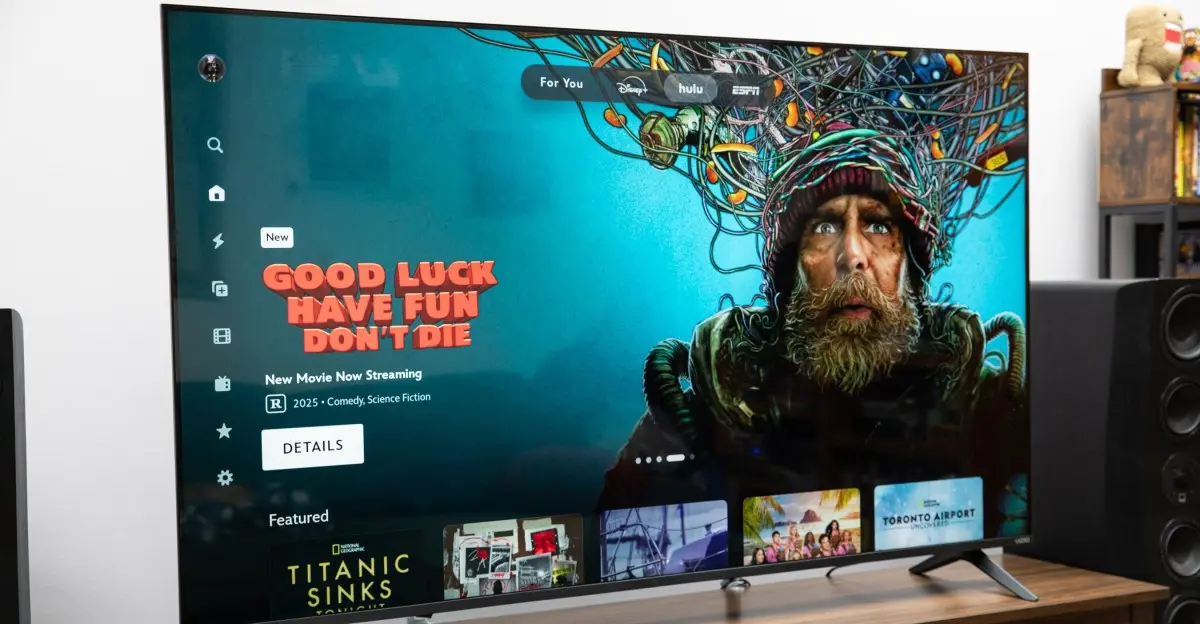
When I first started testing Vizio’s 65-inch Mini LED Quantum TV, I thought the big story was that Vizio was back and that it had a quantum-dot TV for under $398 — the cheapest on the market. Vizio’s been pretty quiet since it was acquired by Walmart in 2024, so putting out a TV with quantum dots, which allow for higher brightness levels and more accurate color, at a budget price seemed like a strong comeback.
But that’s not the big story. While those two points are intriguing, the big news about the Mini LED Quantum TV is that Vizio accidentally made the best dumb TV on the market.
Vizio Mini LED Quantum TV
The Mini LED Quantum is available in sizes from 43 to 85 inches, with the 65-inch model priced at just $398. It features a Mini LED backlight with quantum dots, supporting HDR formats like Dolby Vision, HDR10+, and HLG. The TV runs Vizio OS, but the key to its appeal lies in how easy it is to avoid the operating system entirely.
Walmart bought Vizio primarily for its advertising business. Since Vizio’s ad division was responsible for all of Vizio’s profits at the time of the sale, keeping that ad revenue going is likely the priority here, and Vizio’s TV OS is the vehicle. You now need a Walmart account to use some features on a Vizio TV, and you can’t access any of the streaming apps on the Vizio Mini LED Quantum without agreeing to its activity data policy, which lets Walmart collect all your usage data.
This is not unique to Vizio. Smart TVs from all major brands collect data on what you watch and how you watch it so they can serve targeted recommendations and ads. Vizio itself was caught doing so without consent in 2017, resulting in a $2.2 million settlement with the FTC and the New Jersey Attorney General. The difference with the Mini LED Quantum is that you can completely bypass the OS and use the TV as a dumb display.
How to use it as a dumb TV
During setup, the TV asks you to sign in to, or create, a Walmart account. If you choose to skip, you’re asked if you’re sure and warned that “you will not be able to manage payments and subscriptions or link your Vizio devices.” Many users already manage subscriptions through each streaming service, so this is not a big loss. After agreeing to Vizio’s terms of service and privacy policy, you’re asked to accept the activity data policy, which enables the TV’s smart features. Declining this brings up another warning screen — this one actually says “Whoops!” — informing you that “skipping this step means missing out on all your Vizio smart TV features, including apps like Netflix, YouTube, and other apps.”
One last decline, and the Vizio is the dumb TV many are looking for: no OS and three HDMI ports awaiting a signal. To make sure there’s no way Walmart is getting your info, you can disconnect the TV from the internet entirely by forgetting your Wi-Fi settings. (You can also choose to skip connecting to Wi-Fi at the beginning of setup, which immediately switches the TV to HDMI, but you may miss out on firmware updates.)
Picture quality and performance
For a $400 dumb TV — or even a $400 smart TV — the 65-inch Vizio Mini LED Quantum is really good. I watched multiple World Cup matches using my OTA antenna and my normal collection of weekly shows like Last Week Tonight through my Apple TV, and they all looked pretty good. Of its picture modes, Calibrated and Calibrated Dark are the most accurate. Both lean a little toward blue, so everything has a slight cool cast. Calibrated Dark is the best for color accuracy and for a dark, light-controlled room. With SDR, it tops out at a maximum brightness of 309 nits; HDR gets up to 579 nits with small highlights. Calibrated reaches 936 nits, which is incredible for a budget TV, so its highlights and overall picture can hold up to ambient light. The screen is pretty glossy, though, so if you have lamps nearby, the reflections can be distracting, especially during dark scenes.
There’s a little bit of motion blur with fast motion, which I noticed while watching the Austrian Grand Prix (especially with the cool quick-moving drone shots they introduced with that race). The Mini LED Quantum uses an IPS panel instead of VA, so its black level isn’t as deep as a more expensive TV, and there’s some blooming visible with bright highlights in dark scenes. Most people, though, will be more than happy with the performance of the Vizio Mini LED Quantum. Even I was able to push aside my videophile expectations and relax with what I was watching. For a 65-inch TV under $400 (or up to an 85-inch for only $768), it’s easy to get past those flaws and still enjoy everyday viewing.
Build quality and connectivity
Of course, there are areas where Vizio’s cost-cutting is more obvious. The TV only has three HDMI 2.0 ports, when most TVs will get you four with at least one at HDMI 2.1 (though Vizio does include an ATSC 1.0 tuner). The entire back is made of a cheap-feeling plastic, there’s only one height position for the feet, and the cable management channels on the back of each foot can only accommodate a single cable each. So if you have more than one device connected to the HDMI inputs, you can’t run all the cables through the channel. The speakers, while loud, don’t sound great either — but that can be said for many expensive TVs too.
Data privacy and the future
If you do decide to use the Vizio OS, it’s possible to limit Walmart’s data collection by turning off Viewing Data in the TV’s privacy menu as well as unchecking personalized ads on your Vizio account page. Vizio OS is easy to navigate, if a tad sluggish sometimes. It supports all the major apps, plus AirPlay and Google Cast, and selecting different inputs is easy, both through the OS and with an input button on the small remote. After a few minutes, the TV will go into a screensaver mode, which is just one of the WatchFree+ channels that shows what looks like AI-generated scenes with music playing. But since they’re channels and not an actual screensaver, they get interrupted by ads every once in a while.
My main concern is that the ability to use the Mini LED Quantum as a dumb TV is a complete accident and software updates could change that down the road. If you are required to use it — and thus accept all the activity data collection — recommending the TV becomes a bit harder. Until then, though, the Mini LED Quantum has great performance for the price. If you’ve been looking for a big dumb TV to escape from the incessant data tracking, the Vizio Mini LED Quantum is it. At least for now.
How I test TVs
I set up each TV in my living room on my home theater credenza. I stream movies and shows through the TV’s apps and from an Apple TV, play discs on a Magnetar UDP900 MkII 4K Blu-Ray player (including the Spears & Munsil Ultra HD Benchmark disc) and movies from a Kaleidescape Strato E player, and play games on my Xbox Series X and PlayStation 5. This is done at different times of the day and under different lighting conditions, with curtains open, with lamps and overhead lights on, or with blackout curtains up to keep the room dark. While I am a certified ISF Level 3 calibrator, I do not calibrate the TVs before measurement, as the overwhelming majority of TV owners don’t bother. So it’s important to know how well the TVs perform out of the box, with minor tweaks in the menu anyone can do.
For measurement, I use Portrait Displays’ Calman color calibration software, a Murideo 8K Seven pattern generator, an X-rite i1 Pro 3 spectrophotometer, Portrait Displays’ C6 HDR5000 colorimeter, a Konica Minolta LS-100 luminance meter, and Leo Bodnar 4K lag tester.
Of course, you don’t need to worry about that if you use the Vizio Mini LED Quantum as a dumb TV. It’s not what Walmart hopes you’ll do with it, but it’s absolutely what you should. And if you want streaming apps, you can always plug in a cheap streaming device like the Fire TV Stick 4K Select for $40. Note that if you use a connected device with the Vizio OS active, your viewing data on that device will also be shared with Walmart, according to the viewing data supplement on the privacy policy.
Agree to continue: Vizio Mini LED Quantum TV
Every smart device now requires you to agree to a series of terms and conditions before you can use it — contracts that no one actually reads. In order to manage payments and subscription or link the TV to your Walmart account, you must sign in to or create a Walmart account, and if you had an existing Vizio account, you must merge it with a Walmart account. When creating a Walmart account, you must provide an email address and phone number, and agree to Walmart’s Terms of Use, Privacy Notice, and Mobile Alerts Terms of Use. To use the Vizio Mini LED Quantum TV fully (including Vizio OS), you must accept Vizio Terms of Service, Vizio Privacy Policy, Accept Activity Data to use streaming apps in Vizio OS, and Viewing Data. In total, you have to accept seven main agreements for full functionality and can bypass three to avoid linking a Walmart account, or bypass all of them to turn the Vizio into a dumb TV when setting up the Mini LED Quantum.
Source: The Verge News